
If your Greatmail account works in Classic Outlook and Thunderbird but fails to set up or stops syncing as an IMAP account in the new Outlook for Windows, your settings are probably fine. The difference is how the new Outlook connects: it does not talk to our servers from your PC at all.
We recently worked through a support case that shows the pattern clearly. The customer had done careful troubleshooting: correct server names and ports, a clean Windows profile, and successful logins in Thunderbird and Classic Outlook on the same machine. In the new Outlook, the account either failed during setup or connected once and then stopped receiving new mail.
This article explains why that happens, what it means for where your email is stored, and which email apps we recommend for a dependable connection to your Greatmail mailbox.
Two different apps share the Outlook name
Microsoft now ships two separate Outlook apps for Windows, and many people don’t realize which one they are using.
- Classic Outlook is the long-standing desktop program included with Microsoft 365 and Office. It connects to mail servers directly from your computer and stores mail locally.
- New Outlook for Windows is a newer, web-based app. It replaced the built-in Windows Mail and Calendar apps, and Microsoft 365 users may see a Try the new Outlook toggle in the top-right corner of Classic Outlook.
To check which one you have, look at the top-right corner of the window. If you see a toggle labeled New Outlook that is switched on, you are using the new app. Switching it off returns you to Classic Outlook.
How the new Outlook connects to your mailbox
In the new Outlook, IMAP accounts sync through Microsoft’s cloud, not directly from your computer. Microsoft calls this syncing your account to the Microsoft Cloud.
Microsoft’s own support page describes it plainly: “A copy of your email, calendar, and contacts will be synchronized between your email provider and Microsoft data centers” (Microsoft Support). Your Outlook app then reads from Microsoft’s copy.
For IMAP accounts on Windows, this is not optional. An Independent Advisor on Microsoft’s Q&A forum put it this way: “The New Outlook for Windows now requires all IMAP accounts to sync through the Microsoft Cloud… there’s no way to opt out of this in the New Outlook” (Microsoft Q&A, May 2025). If the cloud sync fails, the account cannot be added.
That changes who connects to our servers. With Classic Outlook or Thunderbird, your computer logs in to Greatmail. With the new Outlook, Microsoft’s servers log in to Greatmail on your behalf, using the credentials you entered.
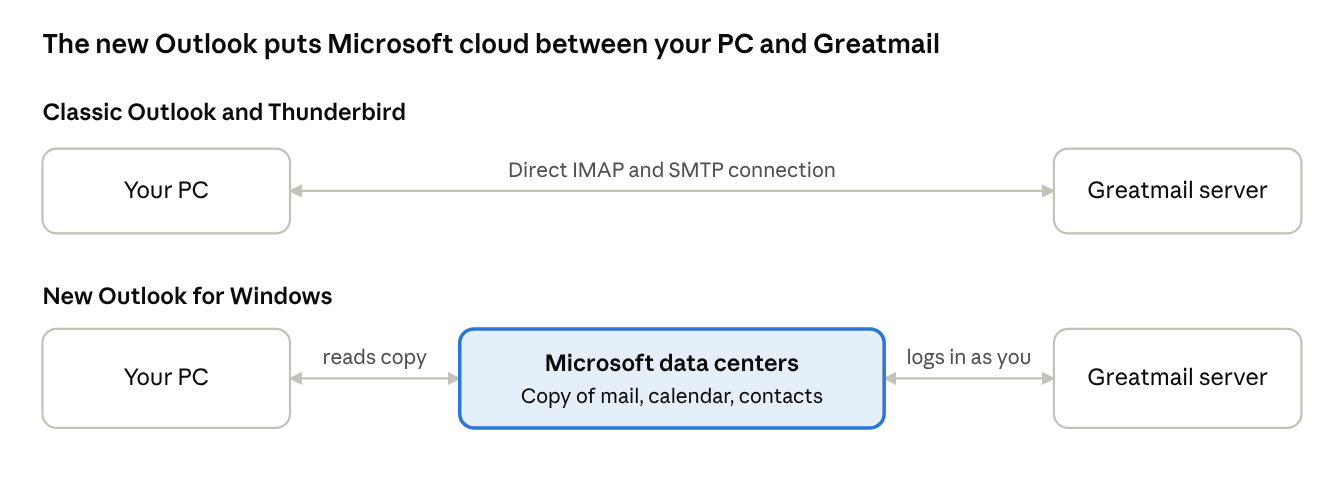
In the new Outlook, your PC never connects to Greatmail; it reads the copy Microsoft keeps.
Why this causes setup failures and missing mail
When Microsoft’s servers sit between your app and your mailbox, a problem anywhere along that path shows up as a problem in Outlook, even when your mailbox and settings are fine.
- New mail arrives late or not at all. Your app no longer holds its own connection to our server, so it sees new mail only after Microsoft’s service has fetched it. Microsoft does not publish how often that happens. Users on Microsoft’s Tech Community report IMAP mail in the new Outlook taking “hours, even days” to appear, while the same accounts work normally in Classic Outlook (Microsoft Tech Community, September 2026).
- Setup fails even with correct settings. If Microsoft’s cloud cannot complete its sync, the new Outlook will not add the account (Microsoft Q&A). Your PC’s network, ports and local settings don’t affect that step.
- Server security can see the traffic differently. Logins arrive from Microsoft data center addresses, not from your office. Mail servers commonly limit simultaneous connections and block addresses after repeated failed logins. Those protections exist to stop attacks, but they can also slow or interrupt a cloud service that syncs many mailboxes from shared addresses.
- The usual fixes don’t apply. Resetting the app, rebuilding a Windows profile or changing ports on your PC can’t fix a connection your PC isn’t making.
This is why the same account can work perfectly in Thunderbird and Classic Outlook on the same computer. Those apps connect to Greatmail directly.
What it means for where your email lives
Using the new Outlook with an IMAP account means a copy of your mailbox also lives with Microsoft. For many people that’s acceptable. For businesses that chose an independent host to keep control of their data, it’s worth knowing before you switch.
- A second copy of your mail. Your email, calendar and contacts are copied to Microsoft data centers (Microsoft Support). Your mailbox stays at Greatmail too, but it is no longer the only copy.
- Your login is shared with Microsoft. For Microsoft’s servers to log in on your behalf, they need your account credentials. MailSite summarizes it: “your account credentials (username, password, or tokens), emails, calendar events, and contacts are synchronized and stored on Microsoft’s Cloud servers” (MailSite, April 2025).
- Different terms apply. Microsoft states that its Services Agreement and Privacy Statement apply to your synced account data, alongside your email provider’s own terms (Microsoft Support).
- Compliance reviews may need updating. If your organization has assessed where its email is stored and who processes it, for example under GDPR or HIPAA, adding a second processor and storage location is a change your compliance team should know about.
What about AI? Microsoft says it does not train its Copilot models on data from commercial customers, people signed in with work accounts, or Microsoft 365 Personal and Family subscribers (Office Watch, summarizing Microsoft’s Copilot FAQ). We have found no evidence that IMAP mail synced through the new Outlook is used to train AI. The privacy concern here is simpler: your mail is copied to a company you may not have chosen to hold it.
The bigger picture for independent email
When the new Outlook fails with an IMAP account, the email provider usually gets the support call, even though the connection that failed runs between Microsoft and the provider. Most users don’t know that a cloud service sits in the middle.
How Microsoft’s apps treat competing services has drawn regulators’ attention before. In 2025 the European Commission accepted commitments from Microsoft to address competition concerns about bundling Teams with its Office products (European Commission). No regulator has taken action over how the new Outlook handles IMAP accounts, but users have raised it on Microsoft’s own forums (Microsoft Q&A).
What we recommend
For a reliable, direct connection to your Greatmail mailbox on Windows, use an email app that connects to our servers itself.
- Classic Outlook. If you have Microsoft 365 or Office, switch off the New Outlook toggle in the top-right corner to return to Classic Outlook. Your Greatmail IMAP settings work as before.
- Mozilla Thunderbird. A free, open-source desktop app that connects directly over IMAP and SMTP and is available for Windows, Mac and Linux.
- Webmail. Greatmail webmail works in any browser and connects to your mailbox directly.
If you choose to keep using the new Outlook, your mail will sync through Microsoft’s cloud, and we can’t change how that layer behaves. A quick test tells you where a problem lies: if your account works in Classic Outlook, Thunderbird or webmail with the same settings, your Greatmail mailbox and settings are working correctly. Any slowness, missed mail or dropped connection in the new Outlook is happening in Microsoft’s sync layer, and Microsoft support is the place to raise it.
Sources and further reading
- Sync your account to the Microsoft Cloud, Microsoft Support
- Supported accounts in new Outlook for Windows, Microsoft Learn, updated October 2025
- Why won’t New Outlook for Windows let me configure my IMAP account?, Microsoft Q&A, May 2025
- New Outlook extremely slow to sync IMAP accounts, Microsoft Tech Community, September 2026
- EU fine incoming for Outlook IMAP debacle?, Microsoft Q&A, December 2024
- Microsoft’s New Outlook: Major Privacy Concerns, Fewer Features, MailSite, April 2025
- Outlook is Microsoft’s new data collection service, Proton, January 2024, updated July 2026
- Is Microsoft using your data to train Copilot AI? The facts, Office Watch, 2024
- Commission accepts commitments by Microsoft on Teams, European Commission, 2025